If you’ve ever edited a photo and wondered whether you should just slap an Instagram filter on it or use a proper Lightroom preset — you’re not alone. The two terms get mixed up constantly, especially by beginners. But they’re actually very different tools, and understanding that difference can completely change how your photos look.
In this guide, we’ll break down exactly what separates a Lightroom preset from a filter, when each one makes sense, and why most photographers and content creators eventually make the switch.
What Is a Filter?
A filter — in the Instagram, Snapchat, or VSCO sense — is a pre-defined visual overlay applied on top of your photo with a single tap. It adjusts colors, contrast, and brightness in one fixed way, with little to no control over the individual settings.
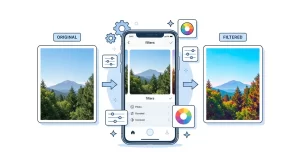
Filters are quick, easy, and built right into the app you’re already using. That’s their biggest appeal. But that simplicity comes at a cost:
- You can’t adjust individual settings like shadows, highlights, or skin tones separately
- The filter looks the same on every photo, regardless of how the original was shot
- It’s applied to a compressed JPEG (not the original RAW file), so quality is already reduced before you even edit
- Once you post the photo, the original look isn’t easy to recreate elsewhere
Filters are fine for casual snapshots — but they’re a ceiling, not a foundation.
What Is a Lightroom Preset?
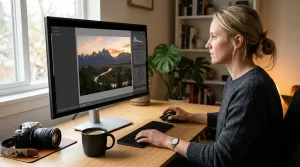
A Lightroom preset is a saved collection of editing settings that can be applied to a photo in one click inside Adobe Lightroom. Unlike a filter, it doesn’t just overlay a look on top of your image — it actually adjusts the underlying editing parameters, including:
- Exposure and contrast
- White balance and color temperature
- Tone curve
- HSL (Hue, Saturation, Luminance) — individual color channel adjustments
- Shadows and highlights
- Grain, vignette, and sharpening
The key difference: a preset changes how your photo is processed, not just how it appears. And because it works directly with Lightroom’s editing engine — including RAW files — you get far more detail, flexibility, and image quality than any filter can offer.
After applying a preset, every single setting it changed is still editable. You can fine-tune anything, or dial the overall effect up or down — something filters simply don’t allow.
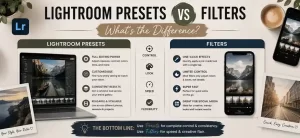
Key Differences at a Glance
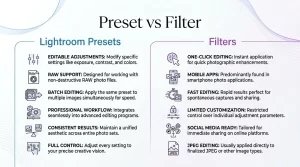
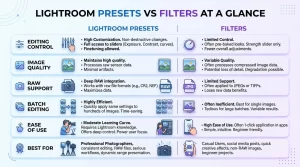
| Filters (Instagram/VSCO) | Lightroom Presets | |
|---|---|---|
| Customization | None or very limited | Full control over every setting |
| File quality | Applied to compressed JPEG | Works with RAW and JPEG |
| Editing control | Fixed, one-tap result | Starting point you can adjust |
| Consistency | Looks different on every photo | Predictable, adjustable result |
| Platform | Locked to specific app | Works across Lightroom Classic and Mobile |
| Professional use | Rarely | Standard workflow tool |
| Portability | Stays in the app | Can be shared, saved, backed up |
Why Photographers and Bloggers Prefer Presets Over Filters
1. Consistency across your entire feed or portfolio
This is the biggest reason content creators make the switch. When you use the same preset (or preset family) across all your photos, they naturally share the same color palette, contrast level, and mood — giving your Instagram feed or blog a professional, cohesive look without spending hours editing each photo individually.
Filters don’t give you this. Because they react differently depending on the original exposure and colors of each photo, two photos with the same filter can look noticeably different from each other.
2. You stay in control
After applying a Lightroom preset, the photo is yours to adjust. Shot in tricky indoor lighting? Lower the shadows. Skin tones look off? Tweak the HSL panel. The preset does 80% of the work — you do the last 20% to make it perfect for that specific shot.
3. Better image quality
Presets work at the processing level, especially with RAW files. You’re not stacking a visual effect on top of an already-compressed image — you’re making precise, non-destructive edits to the original data your camera captured. The result is sharper, cleaner, and more detailed than anything a filter produces.
4. Your look travels with you
Presets are files (.XMP or .DNG) that you own. You can use them in Lightroom Classic on your computer, Lightroom Mobile on your phone, share them with a team, or back them up. Filters live inside a specific app — if the app changes or removes a filter, it’s gone.
When a Filter Might Still Be Enough
To be fair — there are situations where a filter does the job perfectly well:
- You’re shooting casual content (stories, quick snapshots) where image quality isn’t the priority
- You need to post in under 30 seconds
- You’re on a platform where editing access is limited anyway
No judgment here. Not every photo needs a full Lightroom workflow. But if you care about the quality and consistency of your visual content — whether you’re a blogger, travel photographer, wedding shooter, or just building an aesthetic Instagram presence — presets are worth learning.
Which One Should You Use?
If you’re editing photos for a personal blog, a photography portfolio, social media content, or any kind of professional work — Lightroom presets are the better choice, every time. The learning curve is small (especially with ready-made presets), and the difference in output quality is immediately visible.

Filters are a shortcut that works for casual use. Presets are a tool that works for everything else.
The good news: you don’t need to build your own presets from scratch. There are thousands of professionally designed preset packs made for every style — moody, film, vintage, travel, portrait — that let you get professional-looking results without spending hours learning color theory.
Conclusion
Lightroom presets and filters may seem similar at first glance, but they serve different purposes. Filters are great for quick edits and social media posts, while Lightroom presets offer greater control, consistent results, and professional-quality editing—especially when working with RAW photos.
If you’re just getting started, filters can be a simple way to enhance your images. However, if you want to develop a consistent editing style, improve your workflow, or achieve professional-looking results, Lightroom presets are the better long-term choice.
The best way to decide is to experiment with both and see which fits your photography goals. As your editing skills grow, you’ll likely find that presets provide the flexibility and creative freedom needed to make every photo stand out.
Browse our curated preset collections and find a style that fits your photography:
- Moody Lightroom Presets — dark, atmospheric, cinematic tones
- Aesthetic Lightroom Presets — soft, clean, editorial looks
- Film Lightroom Presets — analog grain and natural color tones
- Travel Lightroom Presets — vibrant, warm, adventure-ready edits
This post may contain affiliate links. If you make a purchase through one of these links, we may earn a small commission at no extra cost to you. See our [Affiliate Disclosure] for details.